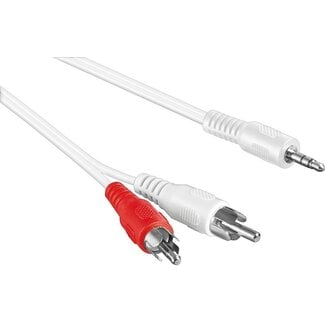
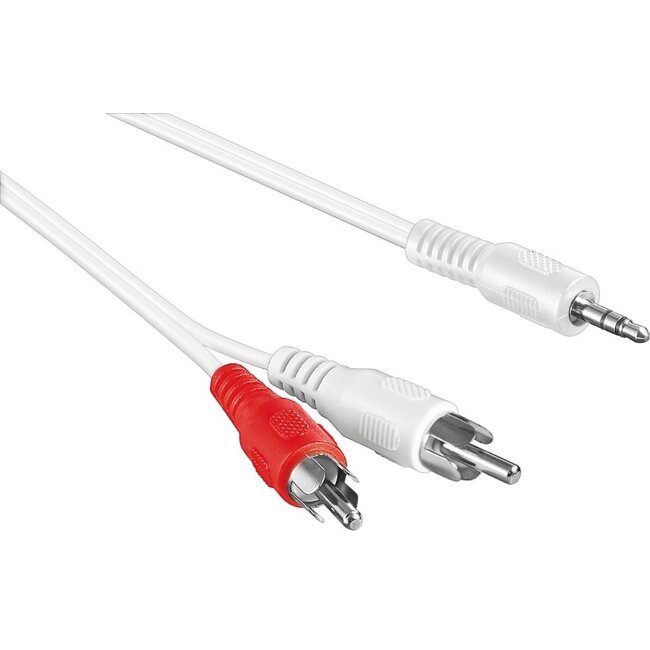
3,5mm Klinkenstecker - Cinch Stereo Audiokabel - Weiß
Verwenden Sie dieses Kabel, um ein Gerät mit 3,5mm Klinkenanschluss mit einem Gerät mit Cinch 2RCA Stereoanschluss zu verbinden und so analoge Audiosignale zu übertragen. Sie können dieses Kabel auch bei tragbaren Geräten verwenden, indem Sie das Gerät über den Kopfhörerausgang beispielsweise mit einem AUX-Eingang verbinden. Der Cinch-Stecker wird auch als RCA-Stecker bezeichnet.
Technische Daten 3,5mm Klinkenstecker - Cinch Stereo Audiokabel - Weiß
- Anschlüsse: 3,5mm Klinke (männlich) - Cinch Stereo 2RCA (männlich)
- Signaltyp: analog stereo
- Ausführung: Standardstecker (gerade / gerade)
- Kabeltyp: rund (Standardkabel)
- Leiter: CCA (Copper Clad Aluminium - Aluminium mit Kupferbeschichtung)
- American Wire Gauge: nicht bekannt
- Konformität: RoHS
- Farbe: Weiß
- Garantie: 2 Jahre
Dieses Produkt ist u.a. kompatibel mit:
Apple MacBook Pro - 15 Zoll (2017)
Apple MacBook Pro - 13 Zoll (2017 - mit 2 Thunderbolt-Anschlüssen)
Apple MacBook Pro - 13 Zoll (2017 - mit 4 Thunderbolt-Anschlüssen)
Apple MacBook Pro - 15 Zoll (2016)
Apple MacBook Pro - 13 Zoll (2016 - mit 2 Thunderbolt-Anschlüssen)
Apple MacBook Pro - 13 Zoll (2016 - mit 4 Thunderbolt-Anschlüssen)
Apple MacBook Retina - 12 Zoll (2017)
Apple MacBook Retina - 12 Zoll (Anfang 2016)
Apple MacBook Retina - 12 Zoll (Anfang 2015)
Apple MacBook Pro Retina - 15 Zoll (Mitte 2015)
Apple MacBook Pro Retina - 13 Zoll (Anfang 2015)
Apple MacBook Pro Retina - 12 Zoll (Anfang 2015)
Apple MacBook Pro Retina - 15 Zoll (Mitte 2014)
Apple MacBook Pro Retina - 13 Zoll (Mitte 2014)
Apple MacBook Pro Retina - 15 Zoll (Ende 2013)
Apple MacBook Pro Retina - 13 Zoll (Ende 2013)
Apple MacBook Pro Retina - 15 Zoll (Anfang 2013)
Apple MacBook Pro Retina - 13 Zoll (Anfang 2013)
Apple MacBook Pro Retina - 13 Zoll (Ende 2012)
Apple MacBook Pro Retina - 15 Zoll (Mitte 2012)
Apple MacBook Pro - 15 Zoll (Mitte 2012)
Apple MacBook Pro - 13 Zoll (Mitte 2012)
Apple MacBook Pro - 17 Zoll (Ende 2011)
Apple MacBook Pro - 15 Zoll (Ende 2011)
Apple MacBook Pro - 13 Zoll (Ende 2011)
Apple MacBook Pro - 17 Zoll (Anfang 2011)
Apple MacBook Pro - 15 Zoll (Anfang 2011)
Apple MacBook Pro - 13 Zoll (Anfang 2011)
Apple MacBook Pro - 17 Zoll (Mitte 2010)
Apple MacBook Pro - 15 Zoll (Mitte 2010)
Apple MacBook Pro - 13 Zoll (Mitte 2010)
Apple MacBook Pro - 15 Zoll (Mitte 2009)
Apple MacBook Air - 13 Zoll (2017)
Apple MacBook Air - 13 Zoll (Anfang 2015)
Apple MacBook Air - 11 Zoll (Anfang 2015)
Apple MacBook Air - 13 Zoll (Anfang 2014)
Apple MacBook Air - 11 Zoll (Anfang 2014)
Apple MacBook Air - 13 Zoll (Mitte 2013)
Apple MacBook Air - 11 Zoll (Mitte 2013)
Apple MacBook Air - 13 Zoll (Mitte 2012)
Apple MacBook Air - 11 Zoll (Mitte 2012)
Apple MacBook Air - 13 Zoll (Mitte 2011)
Apple MacBook Air - 11 Zoll (Mitte 2011)
Apple MacBook Air - 13 Zoll (Ende 2010)
Apple MacBook Air - 11 Zoll (Ende 2010)
Apple MacBook Air - 13 Zoll (Mitte 2009)
Apple MacBook - 13 Zoll (Mitte 2010)
Apple MacBook - 13 Zoll (Ende 2009)
Apple MacBook - 13 Zoll (Mitte 2009)
Apple MacBook - 13 Zoll (Anfang 2009)
Apple MacBook (Aluminium) - 13 Zoll (Ende 2008)
Apple MacBook - 13 Zoll (Ende 2008)
Apple MacBook - 13 Zoll (Anfang 2008)
Apple MacBook - 13 Zoll (Ende 2007)
Apple MacBook - 13 Zoll (Mitte 2007)
Apple MacBook - 13 Zoll (Ende 2006)
Apple MacBook - 13 Zoll (Mitte 2006)
Welches MacBook Modell habe ich?
Es gibt verschiedene Möglichkeiten, um herauszufinden, welches MacBook Modell Sie genau besitzen.
1. Wählen Sie im Apple-Menü oben links auf dem Bildschirm „Über diesen Mac“. Klicken Sie anschließend auf „Systembericht“. Wenn Sie OS X Lion (10.7) oder neuer als Betriebssystem verwenden, sehen Sie ein Fenster mit den Spezifikationen Ihres MacBooks. Unter der Betriebssystemversion steht das MacBook Modell, gefolgt von der Bildschirmgröße und dem Modelljahr.
2. Wenn Sie die Seriennummer Ihres MacBooks haben, können Sie diese auch auf der Apple Webseite eingeben.
Hier klicken, um zur technischen Spezifikationsseite von Apple zu gelangen, und klicken Sie dann auf „Nach Produkt suchen“. Geben Sie dort die Seriennummer ein und klicken Sie auf „Suchen“. Sie sehen dann, welches Modell zu dieser Seriennummer gehört.
Apple TV
Apple TV1,1 - A1218 (1. Generation) - MA711LL/A (Modell 2007)